 Version 3.0 just released! Now with BBM Support!
If you are like us, you sit in front of a PC most of the day with a BlackBerry in your pocket. Every time it rings you have to
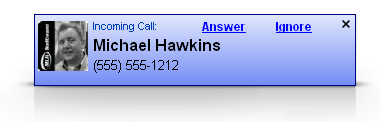
dig it out just to see who is calling, and you think to yourself, wouldn't it be nice if the caller ID just popped up on my computer
screen so I could see who is calling before going through the trouble to dig it out of my pocket?
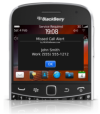
Well that is exactly what Blurts is designed to do. A desktop app and a BlackBerry app talk via Bluetooth to display caller ID info, emails, SMS messages and BBM messages.
With the Bluetooth auto connect feature, don't worry about missing an alert because you forgot to connect your phone to your PC.
No cables to tether your device! You have the freedom to keep your phone where you want it - your pocket, your purse, your holster.
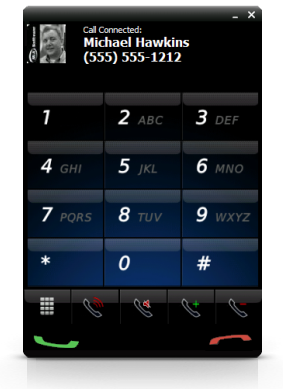
And Blurts Pro takes it to the next level allowing you to place and answer (or ignore) calls from your PC. Also read and send SMS from your desktop.
We recommend first installing Blurts to ensure compatibility with your Bluetooth before purchasing Blurts Pro. You simply have to enter an activation
code to upgrade to Pro - no second install is required.
New in version 3.0:
- BBM Alert support! Inbound BBM messages will be displayed on your PC. We are still not able to send BBM message from the PC due to BlackBerry restrictions.
- Added support for multiply address books. Now all your contacts should download.
- Added 15 day free trial period.
- Fixed some issues with Bluetooth not reconnecting.
- New desktop UI
- New BlackBerry UI
New in version 2.0:
- Major UI Changes:
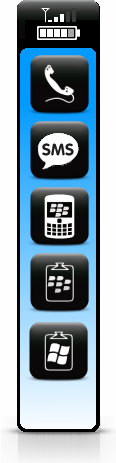
- Toolbar to allow easier access to BlackBerry commands
- Battery and signal strength for BlackBerry is displayed on PC
- Added support to change alert UI theme by placing custom display.xslt in Application Data\MLHSoftware\Blurts\theme folder
- Minor tweaks to alert UI
- SMS Changes
- Improved contact selection dialog
- Improved contact search
- Added support to control SMS font and background color via Options dialog
- Added support to change SMS UI theme by placing custom sms.xslt in Application Data\MLHSoftware\Blurts\theme folder
- Added Windows Hot Key support for Send SMS
- Fixed SMS not sending <, > and &
- SMS supporting more charactor encoding such as Asian
- Phone Call Changes
- Improved Contact selection dialog
- Improved contact search
- New call status dialog that control phone call
- Status dialog allows DTMF tones during call
- Added Windows Hot Key support for Pressing Send Key (Answer call), Pressing End Key (End Call), Place Call
- BlackBerry Changes
- Icon on BlackBerry shows connection status (Blue connected, Red disconnected)
- Option to fetch activation key
- Added option to control PIN Message Alerts seprate from Email Alerts
- Added shortcut key 's' on BlackBerry to send clipboard to PC
- Added shortcut key 'r' on BlackBerry to read clipboard to PC
- Added shortcut key 'x' on BlackBerry to send screen shot to PC after 5 second delay (allow you time to get to the screen you want to screen shot)
- Scripting support via an exposed document object model for each alert type using JScript or VBScript
- Improved contacts download
- Improved screen capture
- Added Windows Hot Key support for Read Clipboard, Send Clipboard.
- Added copy text support to alerts and dialogs
Blurts Features:
Blurts Pro Features:
 Help Page
 Download
 Purchase
BlackBerry® Requirements:
Available for BlackBerry® smartphones with OS v4.2.1 or higher and Bluetooth support.
including:
PC Requirements:
Windows XP, Windows Vista, or Windows 7 with .Net 2.0 and Bluetooth hardware.